Monday, November 18, 2019

Form event handlers in D365FO

Form datasource from xFormRun
[FormEventHandler(formStr(SomeForm), FormEventType::Initialized)]
public static void SomeForm_OnInitialized(xFormRun sender, FormEventArgs e)
{
    FormDataSource MyRandomTable_ds = sender.dataSource(formDataSourceStr(SomeForm, MyRandomTableDS));
    ...
}

Get FormRun from form datasource

[FormDataSourceEventHandler(formDataSourceStr(MyForm, MyRandomTableDS), FormDataSourceEventType::Written)]
public static void MyRandomTableDS_OnWritten(FormDataSource sender, FormDataSourceEventArgs e)
{
    FormRun formRun = sender.formRun() as FormRun;
    // you can even call custom methods (I think IntelliSense won't work though)
    formRun.myCustomMethod();
}

Get FormRun from form control

[FormControlEventHandler(formControlStr(MyForm, MyButton), FormControlEventType::Clicked)]
public static void MyButton_OnClicked(FormControl sender, FormControlEventArgs e)
{
   FormRun formRun = sender.formRun() as FormRun;
   formRun.myCustomMethod();
}

Access form control from xFormRun

[FormEventHandler(formStr(SomeForm), FormEventType::Initialized)]
public static void SomeForm_OnInitialized(xFormRun sender, FormEventArgs e)
{
    // set the control to invisible as an example
    sender.design().controlName(formControlStr(SomeForm, MyControl)).visible(false);
}

Get current record in form control event

[FormControlEventHandler(formControlStr(SomeForm, SomeButton), FormControlEventType::Clicked)]
public static void SomeButton_OnClicked(FormControl sender, FormControlEventArgs e)
{
    // as an example the datasource number is used for access; I perceive the formDataSourceStr as more robust
    SomeTable callerRec = sender.formRun().dataSource(1).cursor();
}

Convert Common and use DataEventArgs

[DataEventHandler(tableStr(AnyTable), DataEventType::ValidatedWrite)]
public static void InventLocation_onValidatedWrite(Common sender, DataEventArgs e)
{
    // convert Common to AnyTable
    AnyTable anyTable = sender;
    // the DataEventArgs actually are ValidateEventArgs and can be converted
    ValidateEventArgs validateEventArgs = e;
    // the ValidateEventArgs carry the validation result (so far)
    boolean ret = validateEventArgs.parmValidateResult();
    // the table has some additional validation logic and gives back the result
    ret = anyTable.doSomeAdditionalCustomValidation(ret);
    // provide the args with the validation result
    validateEventArgs.parmValidateResult(ret);
}

Use the onValidatedFieldValue event properly

[DataEventHandler(tableStr(SomeTable), DataEventType::ValidatedFieldValue)]
public static void SomeTable_onValidatedFieldValue(Common sender, DataEventArgs e)
{
    SomeTable someTable = sender;
    // the clue is to know that the DataEventArgs actually are ValidateFieldValueEventArgs and that you can get the field name from them
    ValidateFieldValueEventArgs validateEventArgs = e;
    boolean ret = validateEventArgs.parmValidateResult();
    FieldName fieldName = validateEventArgs.parmFieldName();
    switch (fieldName)
    {
        case fieldStr(SomeTable, SomeCustomField):
            ... do some magic
            break;
    }
    validateEventArgs.parmValidateResult(ret);
}

Use the MappedEntityToDataSource event

[DataEventHandler(tableStr(MyTableEntity), DataEventType::MappedEntityToDataSource)]
public static void MyTableEntity_onMappedEntityToDataSource(Common _sender, DataEventArgs _eventArgs)
{
    DataEntityContextEventArgs eventArgs = _eventArgs;
    MyTableEntity entity = _sender;
    if (eventArgs.parmEntityDataSourceContext().name() == dataEntityDataSourceStr(MyTableEntity, MyTable))
    {
        MyTable myTable = eventArgs.parmEntityDataSourceContext().getBuffer();
        ... do some magic with it
    }
}

Code to identify data type and generate the data template

The below code will help you to generate the data template with field data type in csv file

public static void main(Args _args)
{
DictTable dictTable = new DictTable(tableNum(HcmEmployeeEntity));
FieldId fieldId = dictTable.fieldNext(0);
DictField dictField;
DictType dictType;
DictEnum dictenum;
CommaIo file;
container line;
str help;
str helpdefined;
#define.filename(@”C:\Temp\employee.csv”)
#File
file = new CommaIo(#filename, #io_write);
if (!file || file.status() != IO_Status::Ok)
{
throw error(“File cannot be opened.”);
}
while(fieldId)
{
dictField = dictTable.fieldObject(fieldId);
line = [dictField.name(), enum2Str(dictField.baseType()), dictField.label(), enum2Str(dictField.mandatory()), dictField.displayLength(),dictField.stringLen()];
file.writeExp(line);
fieldId = dictTable.fieldNext(fieldId);
}
}

Batch number registration for sales return order.

Hi

The below code will be helpful to register the batch number during sales return order packing slip posting

public void registerInventory(RefRecId _recId, InventQty _qty, InventBatchId _batchId)
{   

       InventTransWMS_Register     inventTransWMS_register;
        TmpInventTransWMS            tmpInventTransWMS;
         InventDim                               inventDim;
        SalesLine                                 salesLine;
        InventTrans                              inventTranslocal

inventTransWMS_register         = inventTransWMS_register::newStandard(tmpInventTransWMS);

            salesLine                       = CustConfirmTrans::findRecId(_custConfirmTransRecId).salesLine();
            inventDim                                   = salesLine.inventDim();
            inventTranslocal                          = InventTrans::findTransId(salesLine.InventTransId, true);
           
            inventDim.inventBatchId            = _inventBatchId;
            inventDim                                    = inventDim::findOrCreate(inventDim);
            inventTranslocal.inventDimId     = inventDim.inventDimId;
                         
            tmpInventTransWMS.clear();
            tmpInventTransWMS.initFromInventTrans(inventTranslocal);
            tmpInventTransWMS.ItemId        = inventTranslocal.ItemId;
            tmpInventTransWMS.InventQty     = _qty;
            tmpInventTransWMS.insert();

            inventTransWMS_register.writeTmpInventTransWMS(tmpInventTransWMS,
                                                            inventTranslocal,
                                                            inventDim);
     
            inventTransWMS_register.updateInvent(inventTranslocal);
}

JumpRef method to call the form

public void jumpRef()
{
MenuFunction menuFunction;
super();
menuFunction = new MenuFunction(menuitemdisplaystr(CustTable), MenuItemType::Display);
menuFunction.run();
}

Hide the batch tab in Dialog window in D365FO

1. Create UI builder class
2. Override the dialogPostRun method in UI builder class

protected void dialogPostRun()
{

SysOperationDialog  sysOperationDialog;
DialogTabPage         batchTabPage;
FormRun                   formRun;

super();
sysOperationDialog  = this.dialog() as SysOperationDialog;
formRun                   = sysOperationDialog.formRun();
batchTabPage          = sysOperationDialog.batchDialogTabPage();
formRun.selectControl(dialogTabPage.control());

}

Open the form in Edit mode using x++

FormRun         formRun;
Args                 args;
MenuFunction  menuFunction;
args = new Args();
args.record(VendTable::find(‘1001’));
menuFunction = new MenuFunction(menuitemDisplayStr(VendTable), MenuItemType::Display);
if(menuFunction)
{
menuFunction.openMode(OpenMode::Edit);
formRun = menuFunction.create(args);
if(formRun)
formRun.run();
}

Monday, April 15, 2019

Financial Dimensions and their related entity tables


    • Financial dimension 'Use values from'Related entity
      < Custom dimension >DimAttributeFinancialTagEntity
      AgreementsDimAttributeAgreementHeaderExt_RUEntity
      Bank accountsDimAttributeBankAccountTableEntity
      BusinessUnitsDimAttributeOMBusinessUnitEntity
      CampaignsDimAttributeSmmCampaignTableEntity
      Cash accountsDimAttributeRCashTable_RUEntity
      Cost centersDimAttributeOMCostCenterEntity
      Customer groupsDimAttributeCustGroupEntity
      CustomersDimAttributeCustTableEntity
      DeferralsDimAttributeRDeferralsTable_RUEntity
      DepartmentsDimAttributeOMDepartmentEntity
      Expense and income codesDimAttributeRTax25ProfitTable_RUEntity
      Expense PurposesDimAttributeTrvTravelTxtEntity
      Fiscal establishmentsDimAttributeFiscalEstablishment_BREntity
      Fixed asset groupsDimAttributeAssetGroupEntity
      Fixed assetsDimAttributeAssetTableEntity
      Fixed assets (Russia)DimAttributeRAssetTable_RUEntity
      FundsDimAttributeLedgerFund_PSN
      Item groupsDimAttributeInventItemGroupEntity
      ItemsDimAttributeInventTableEntity
      JobsDimAttributeHcmJobEntity
      Legal entitiesDimAttributeCompanyInfoEntity
      POS registersDimAttributeRetailTerminalEntity
      PositionsDimAttributeHcmPositionEntity
      Project contractsDimAttributeProjInvoiceTableEntity
      Project groupsDimAttributeProjGroupEntity
      ProjectsDimAttributeProjTableEntity
      ProspectsDimAttributeSmmBusRelTableEntity
      Resource groupsDimAttributeWrkCtrResourceGroupEntity
      ResourcesDimAttributeWrkCtrTableEntity
      StoresDimAttributeRetailStoreEntity
      Value streamsDimAttributeOMValueStreamEntity
      Vendor groupsDimAttributeVendGroupEntity
      VendorsDimAttributeVendTableEntity
      WorkersDimAttributeHcmWorkerEntity
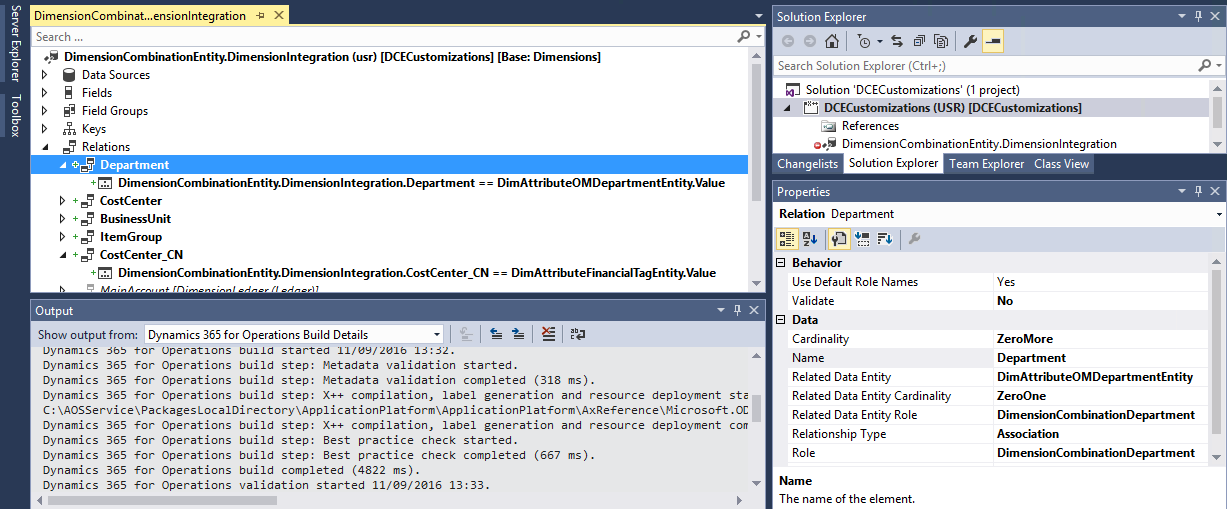
    • Right-click the Financial dimension name under Relations.
    • Select New, and then click Normal.
    • In the Properties pane, choose the name of the Financial dimension in the Field.
    • In the Related field, type Value. The new relation is similar to the following example.
      1. Right-click DimensionCombinationEntity or DimensionSetEntity. Select Open.
      2. Right click Relations. Select New and then click Relation.
      3. In the Properties pane, set the following properties.
        • Validate - No
        • Cardinality - ZeroMore
        • Name - Enter the name of the financial dimension, such as Department.
        • Related Data Entity - Select the entity for the financial dimension that you entered in the Name field. The following table contains a list of the financial dimensions and the related entities.
    • Related Data Entity Cardinality - ZeroOne
    • Related Data Entity Role - Enter a unique name, such as Dimension Department.
    • Relationship Type - Association
    • Role - Enter a unique name, such as Dimension Department.
  1. DimensionCombinationEntity.DimensionIntegration.Department==DimAttributeOMDepartmentEntity.Value
    
    lookupwiki
  2. Build the project and then synchronize it with the database.